
Free, Pass and Pro.
Start with Free. It has no time limit. Pay when you want more scenes, more screens or a sharper picture.
Start with Free. It has no time limit. Pay when you want more scenes, more screens or a sharper picture.
$0 no time limit
$9.99 a month, or $79.99 a year
7 days free
$199 pay once, keep it
14 days free
Prices for in
Prices are in US dollars.
Four features as pictures. The table further down has the full list.

Your logo on top of the scenes. Press a key and it comes in on the beat, then goes after a few bars.
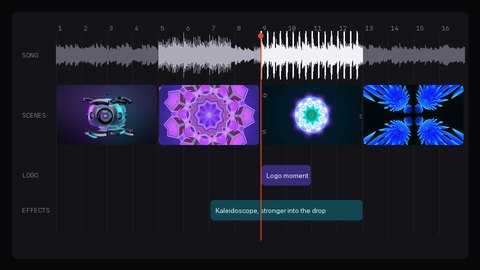
Put songs, scenes, effects and logo moments in order ahead of time. Press play and VoidQ runs the show.
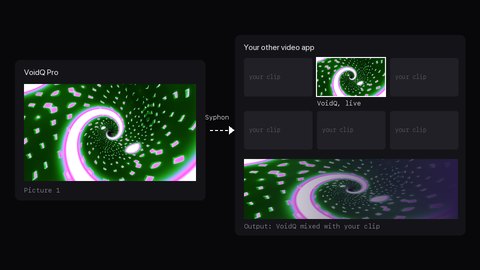
Other video apps on your Mac can use VoidQ's picture like a live camera and mix it with their own clips.
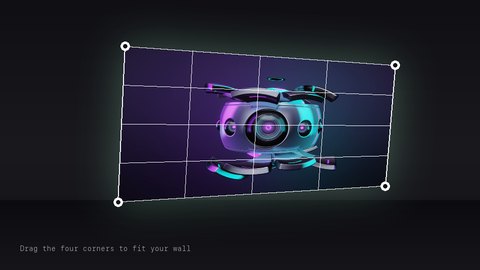
Drag the corners so the picture sits straight on your wall, even when the projector is off to one side.
You can move up or down a plan at any time. Nothing you made gets deleted.
A tick means the plan has it. A dash means it doesn't.
| What you get | Free$0no time limit | Pass$9.99a month | Pro$199once |
|---|---|---|---|
| The basics | |||
| Price | $0 | $9.99 a month, or $79.99 a year | $199, once |
| Free trial | No time limit | 7 days | 14 days |
| Where to get it | Mac App Store | Mac App Store | voidq.app |
| Macs you can use it on | Your App Store Macs | Your App Store Macs | 2 at a time |
| Music | |||
| Follows the beat, the build-ups and the drops | Yes | Yes | Yes |
| Changes scenes by itself | Yes | Yes | Yes |
| Listens to one music app and ignores other sounds | Yes | Yes | Yes |
| Learns your songs before the show | No | Yes | Yes |
| Colours taken from a song cover or a photo | No | Yes | Yes |
| Scenes and effects | |||
| Scenes | 36, plus one from each other pack | All 126 | All 126 |
| Effects | 16, three at a time | 16, as many as you like | 20, as many as you like |
| Layers in one scene | 2 | 5 | 12 |
| Scene changes that melt one scene into the next | No | Yes | Yes |
| Your own photos and videos | 3 | No limit | No limit |
| Sets of nine scenes in a show | 1 | 5 | 12 |
| Shows you can save | 1 | No limit | No limit |
| Your name on the screen | |||
| Your logo | No | Yes | Yes |
| Logo moment: your logo comes in on the beat when you press a key | No | Yes | Yes |
| A different logo on each screen | No | No | Yes |
| Your text: your name, a message or a line that scrolls | No | Yes | Yes |
| Text fonts and looks | 5 fonts, 3 looks | All | All |
| VoidQ logo on the screen | Small, in a corner | None | None |
| Screens | |||
| Screens with different pictures | 1 | 2 | 2 |
| The same picture on extra screens | No | Yes | Yes |
| Picture quality | HD (720p) | Full HD (1080p) | 4K |
| Mapping: fit the picture to a wall, a table or a projector at an angle | Yes | Yes | Yes |
| Show it on a TV with AirPlay, no cable | Yes | Yes | Yes |
| Recording | |||
| Record your visuals as video | 30-second clips in HD | Any length, up to Full HD | Any length, up to 4K |
| Four shapes at once: wide, square, portrait and tall (TikTok) | No | Yes | Yes |
| Instant replay: save the last 30 seconds | No | Yes | Yes |
| Control | |||
| Keyboard: scenes on 1 to 9, effects on letter keys | Yes | Yes | Yes |
| Phone remote: your phone or tablet on the same Wi-Fi, paired with a code | No | Yes | Yes |
| DJ and MIDI controllers: choose what each pad and knob does | No | Yes | Yes |
| Pad lights: your pads light up to show what is playing | No | Yes | Yes |
| For people who do visuals for a living | |||
| Timeline: plan the whole show, then let it play | No | No | Yes |
| Syphon output: send the picture to other video apps on your Mac | No | No | Yes |
| OSC: VoidQ controls other VJ apps, or they control VoidQ | No | No | Yes |
| A project file for each venue | No | No | Yes |
You go back to Free. Everything you made stays on your Mac. You can't add more than Free allows until you subscribe again.
Yes. You pay once and keep it. It includes 12 months of updates.
Macs with an Apple chip (M1 or newer).
Windows is next, after the Mac. iPad, iPhone and Android come later.
You don't make a VoidQ account. Free and Pass come from the Mac App Store, so your Apple account is all you need.
Founder price
VoidQ comes out soon. The first 150 people to buy Pro pay $149 instead of $199, and for the first four weeks Pass is $59.99 a year instead of $79.99. Join the list and you'll hear before anyone else.
Prices are approximate. We charge in US dollars.
VoidQ isn't out yet. Join the list and you'll hear first. The first 150 people to buy Pro pay $149 instead of $199.
Coming to Mac first, then Windows. iPad, iPhone and Android later.
Made by Virtual Void, a projection studio in Toronto.